

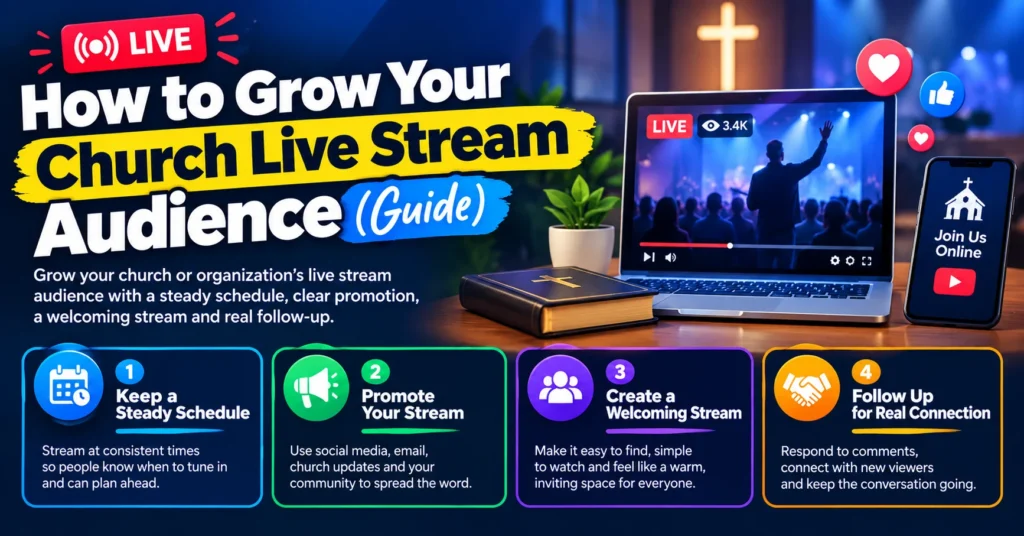
A live stream audience grows the same way a congregation or community does: through consistency, invitation and a warm welcome. Stream at the same time every week, tell people about it ahead of time, make it easy to find and watch, include online attendees in what is happening, and follow up afterwards. Those habits matter more than equipment or any single trick.
This guide walks through each step for churches and other organizations, covers what to measure, and is straightforward about where paid viewer services do and don’t fit.
Start by knowing who you’re serving online
Most live stream audiences are a mix of a few groups, and each needs something different:
- Regular members who can’t attend in person. They may be travelling, unwell, caring for family or living far away. They want to feel part of the gathering and stay connected.
- Visitors checking you out first. Many people watch online before they walk through the door. They want to know what to expect, so clear, welcoming content helps.
- Curious or searching viewers. Some find a stream through a search or a shared link. They need a quick sense of who you are and what you offer.
- Members who watch the replay later. They need the recording to be easy to find and watch on their own schedule.
Write down which of these groups matter most to you. That answer shapes your schedule, your titles and what you say at the start of each stream.
Make your stream easy to find and watch
Keep a fixed schedule
Stream at the same time on the same day every week. People build habits around reliable times, and a fixed schedule makes it easy for members to invite others.
Write clear titles and descriptions
Use plain words that tell a stranger what the stream is: the name of your church or group, the day, and the topic or series. Include your location and service times in the description so searchers can tell whether you are nearby.
Use a recognizable thumbnail
Pick a consistent design with your name and the series title, so regulars spot it at a glance and newcomers can see it is part of a regular program.
Choose the right platform
Many organizations use both YouTube and Facebook. Each suits a slightly different audience:
| Platform | Strengths | Worth considering when |
|---|---|---|
| YouTube | Searchable, keeps replays organized in playlists, works well on TVs and phones | You want people outside your existing circle to find you through search |
| Reaches people through your page, groups and notifications | Your members already use Facebook and share posts with friends |
Check licensing before you stream music
If your services include songs, find out what licenses you need to stream them. Many organizations need a streaming license for worship music, and streams can be muted or removed if the rights aren’t covered.
Promote each service before it starts
People attend what they have heard about. Build a simple routine for every week:
- Announce it in person. Mention the stream and how to find it at the end of each gathering.
- Put the link everywhere. Add it to your website homepage, email footer, bulletin, social profiles and signage.
- Send a weekly reminder. An email or text on the day, with a single direct link, brings people back.
- Schedule the stream in advance. A scheduled event lets people set a reminder and see it before it begins.
- Share a short preview. A clip, quote or question from this week’s message gives people a reason to join.
- Equip members to share. Give them a ready link or post to send to a friend, because a personal invitation is more effective than any announcement.
- Welcome newcomers by name. Explain on your site what to expect, so someone watching for the first time isn’t lost.
- Test your setup beforehand. Check audio, video and connection before the start time, since a poor first impression is hard to undo.
During the service: include the people online
Online viewers decide quickly whether they are part of the gathering or just watching it. A few small habits help them feel included:
- Greet them directly. A short welcome to those watching online, said to the camera, makes a difference.
- Assign an online host. One person can welcome people in the chat, answer questions and share links, so viewers don’t feel ignored.
- Explain what’s happening. Don’t assume viewers can see everything in the room. A line of context before a song, reading or announcement helps.
- Share clear next steps. Put your website, giving link, group sign-up or contact details in the chat and on screen.
- Invite them to respond. Ask viewers to say hello, share a prayer request or tell you where they are watching from.
- Keep the stream steady. A stable camera, clear sound and a simple layout matter more than elaborate production.
- Moderate the chat. Keep it welcoming, and remove spam or abuse quickly.
After the service: turn viewers into community
The stream is the start of the relationship, not the end of it.
- Publish the replay promptly. Keep it public, with a clear title and the date, so members who missed the live stream can watch it.
- Organize replays into playlists. Group them by series or topic so a new viewer can find a place to begin.
- Cut short clips. A one-to-three-minute highlight is easy to share and can introduce your community to people who would never watch a full service.
- Follow up with first-time viewers. If someone introduces themselves in the chat or fills in a form, reach out with a warm, low-pressure message.
- Offer a next step. Invite them to a small group, a welcome event or a visit, and tell them what to expect when they arrive.
- Thank regulars. A short note of appreciation helps online attendees feel seen.
Measure what matters
A single viewer count tells you very little. Look at a few numbers together and track them over several weeks rather than one service at a time:
| Metric | What it tells you |
|---|---|
| Peak and average live viewers | How many people join and how many stay |
| Average watch time | Whether people stay engaged or leave early |
| Replay views | Whether members catch up later |
| Returning viewers | Whether your regulars are growing |
| Chat participation | Whether online attendees feel included |
| Contacts and visits | Whether viewers take a next step, such as a form, message or first visit |
The last row is the one that counts most. A stream that brings ten people to a welcome event has done more than one with a large number and no follow-up.
If you report attendance to a board, denomination, donors or members, report real numbers. Keep any purchased or artificial activity out of those figures.
Where paid live viewer services fit, and where they don’t
For a church or an organization, the point of a live stream is real people and real connection, so a purchased viewer count is usually a poor fit. It adds a number to the screen, not a person to the community, and it can mislead the people who rely on your attendance figures.
If you still want to understand the option, here is what it is:
- It adds a visible count for a chosen duration. Social Boostly’s YouTube and Facebook live viewer pages offer durations from 15 to 120 minutes, starting from $1.20 for 100 viewers at the 15-minute option (USD, as of October 13, 2026).
- It doesn’t bring chat, members or giving. The pages state that orders do not guarantee chat participation, followers, subscribers, sales or wider distribution.
- Timing is separate from duration. Delivery usually starts within 0–60 minutes of payment confirmation, which may not line up with a one-hour service.
- Platforms restrict artificial engagement. YouTube prohibits it, and Meta acts against fake engagement on Facebook, so any order carries some risk.
- Never include it in reported attendance. Keep purchased activity out of any numbers you give to leadership, donors or members.
If your organization wants a brief visibility boost for a one-off launch event, you can read the scope notes on the YouTube Live Stream Viewers and Facebook Live Stream Viewers pages first. For general guidance on live audiences, see our guide on how to get more views and live viewers on your live stream.
Frequently asked questions
How can a church get more people to watch its live stream?
Stream at a fixed time each week, announce it in person and online, share the link everywhere, welcome online viewers during the service, and follow up with first-time viewers afterwards.
Which platform is best for a church live stream?
Many organizations use both YouTube and Facebook. YouTube suits search and organized replays, and Facebook suits reaching members through your page and groups.
How long should a church live stream be?
There is no set length. Most organizations stream the full gathering, and many also publish shorter clips for people who won’t watch a full service.
Do we need a license to stream music?
Often, yes. Requirements depend on your country and the music you use, so check before you stream.
Is it a good idea to buy live viewers for a church stream?
Generally no. A purchased count doesn’t add real people or connection, platforms restrict it, and it should never appear in attendance figures you report.
Start small and stay consistent
Growing a live stream audience is a matter of steady habits: a regular schedule, clear promotion, a welcoming online experience and a real follow-up. Pick two or three things from this guide, do them every week for a couple of months, and look at the trend rather than a single service.
If you’d like to explore growth options for your channels, you can browse Social Boostly’s YouTube and Facebook services, each with the price per 1,000 and scope notes on its page. You can also read about how we work or contact the team with questions.
Prices are listed in USD as of October 13, 2026 and may change. Results may vary. Platform rules and terms apply.