

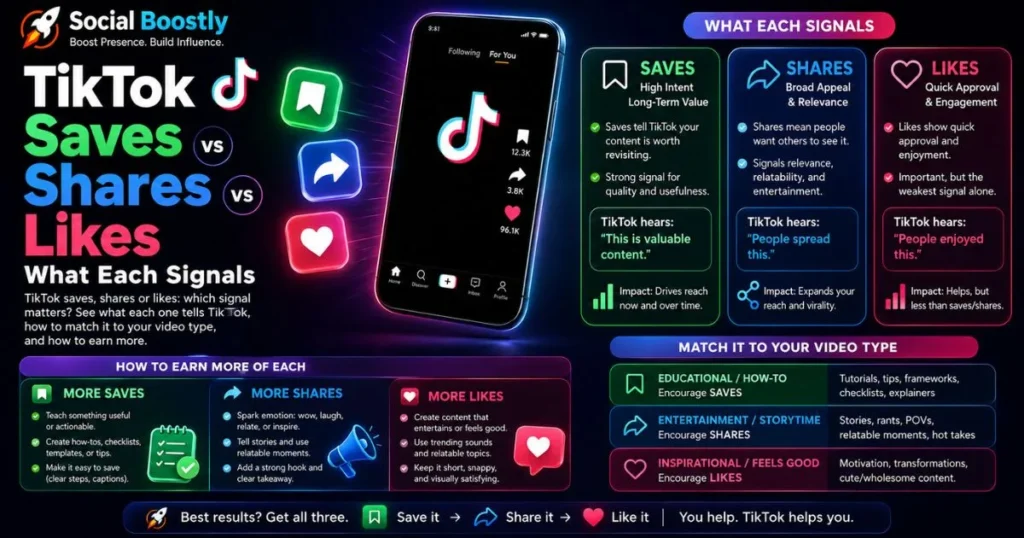
Likes, saves and shares each tell TikTok something different. A like says “I enjoyed this,” a save (TikTok calls it adding to Favorites) says “I want to come back to this,” and a share says “someone I know should see this.” TikTok doesn’t publish how much each one is worth, so the useful question isn’t which is best. It’s which one your type of video should naturally earn.
This guide explains what TikTok has said about its For You feed, what each action signals, how to match the metric to your content, how to earn more of each, and what buying them can and can’t do.
What TikTok has said about its For You feed
In its newsroom explanation of how videos are recommended, TikTok groups the signals into three kinds:
- User interactions: videos people like or share, accounts they follow, comments they post and content they create.
- Video information: details such as captions, sounds and hashtags.
- Device and account settings: such as language and device type.
TikTok has also said that follower count and past high-performing videos are not direct factors in the recommendation system, and that videos seeking to artificially increase traffic are not eligible for the For You feed. TikTok does not disclose how each signal is weighted.
That post dates from 2020, and TikTok has said it keeps adjusting its models and the factors behind them. Treat any exact ranking of likes, saves and shares as an informed guess. Viewing behaviour such as watch time, completion and rewatches is widely reported as a strong signal as well.
What each action tells TikTok
| Action | What it shows | Typical reason someone does it |
|---|---|---|
| Like | Quick approval | “That was good” |
| Save (Add to Favorites) | Lasting value | “I want to find this again” |
| Share | Worth passing on | “This is for a friend” |
| Comment | Something to say | A reaction, a question or a debate |
| Follow | Interest in more from you | “I want more of this” |
A like takes a tap. A save or a share takes a little more intent, which is why creators often treat them as stronger signs of value. That is a reasonable reading, not an official ranking.
Match the metric to the type of video
Different videos earn different reactions. Aim for the one that fits what you make.
| Video type | Reaction it earns best | Why |
|---|---|---|
| Funny or relatable | Shares | People send jokes and “this is us” moments to friends |
| Tutorials, recipes, workouts, travel tips | Saves | People keep useful content for later |
| Trends, personality and storytelling | Likes and follows | People enjoy it and want more from you |
| Opinions and questions | Comments and shares | People want to respond or pass it on |
| Product demos | Saves and comments | Buyers keep it for later and ask questions |
If your tutorials get plenty of likes but few saves, the video probably entertains but doesn’t give people something to keep. Add a clear checklist, step list or takeaway on screen.
Why rates matter more than totals
Compare each reaction with your views, not with other creators’ totals. Here is a made-up example:
| Video A | Video B | |
|---|---|---|
| Views | 10,000 | 2,000 |
| Likes | 600 (6%) | 160 (8%) |
| Shares | 40 (0.4%) | 60 (3%) |
| Saves | 90 (0.9%) | 70 (3.5%) |
Video A has bigger totals. Video B has much stronger rates on shares and saves, which suggests it connected better with the people who saw it. The numbers are for illustration only, but the habit is useful: divide by views.
How to earn more of each
More likes
- Open with a hook in the first second.
- Keep pacing tight and the payoff clear.
- Show personality, because people like people.
More saves
- Teach one clear thing, such as a recipe, a routine, a template or a short list.
- Put the key steps on screen so they’re easy to remember.
- Say why it’s worth keeping, for example “save this for your next trip.”
More shares
- Make something relatable enough that people think of a specific friend.
- Pose a question or a take that people want to send to someone.
- Make the video easy to understand without the caption.
All three
- Keep viewers watching to the end, since every reaction starts with attention.
- Use captions and on-screen text, because many people watch without sound.
- Reply to comments, which keeps people engaged with your account.
- Test one change at a time so you know what worked.
Our guide to Instagram likes vs saves vs shares shows how the same metrics work on another platform.
Where to see these numbers
With a creator or business account, open TikTok Analytics. For each video you can see views, likes, comments, shares and saves, as well as watch time and where the views came from. Compare:
- Likes, shares and saves as a percentage of views.
- Average watch time and how many people finished the video.
- The share of views from the For You feed.
Look across your last 10 to 20 videos rather than one, and note which topics earn which reaction.
Mistakes that hold videos back
- Asking for likes, saves and shares in every video, which can feel pushy.
- Using a long intro before the point.
- Making content that’s hard to understand without sound.
- Posting without a clear topic or audience.
- Judging a video by its first hour.
- Copying trends that don’t fit your niche.
What buying TikTok likes, saves or shares does and doesn’t do
These services add to a visible count on a public video you submit. At Social Boostly they are listed separately (USD, as of October 21, 2026):
| Service | Price | Minimum |
|---|---|---|
| TikTok Likes | $3.00 per 1,000 | 50 |
| TikTok Saves | $4.00 per 1,000 | 50 |
| TikTok Shares | $5.00 per 1,000 | 50 |
TikTok Saves can be ordered up to 100,000 in steps of 50. Orders are processed manually, delivery usually begins within 0–60 minutes of payment confirmation, no password is needed, and a 30-day refill is available on request for eligible orders.
What they do:
- Raise a visible number on one video.
What they do not do:
- They do not create watch time, rewatches or real interest in your content.
- They do not prove that people found the video useful or plan to return to it.
- They do not guarantee For You placement, more views, followers or sales.
- They do not add other metrics. Views, followers and comments are separate services. See TikTok Views.
There is also a platform risk. TikTok has said it doesn’t allow fake engagement or services that artificially increase engagement metrics, and it has said that videos seeking to artificially increase traffic aren’t eligible for the For You feed. Manual processing, no-password ordering and a refill window don’t mean TikTok approves a service. Our guide on whether follower count really matters explains why a visible number is different from real engagement.
The service listings also don’t state the delivery source, account characteristics or targeting, so don’t assume purchased activity comes from your target audience.
How to keep your reporting honest
- Report likes, saves and shares as separate numbers, not as one “engagement” total.
- Use rates (divided by views), not just totals.
- Keep purchased and organic numbers separate in reports to brands, partners and clients.
- Look at watch time, completion and comments as well.
- Compare videos of the same type and length.
Frequently asked questions
Are saves more important than likes on TikTok?
TikTok hasn’t published weights. Saves are often treated as a stronger sign of value because they take more intent, but that’s an interpretation, not an official ranking.
Do shares help a video get more views?
Shares show that people thought a video was worth passing on, and TikTok lists shares among its interaction signals. How much they help isn’t published.
What is a save on TikTok?
A save is when someone adds your video to their Favorites so they can find it again later.
Which should I aim for first?
Aim for the one that fits your content: shares for relatable or funny videos, saves for tutorials and tips, and likes and follows for personality-led videos. Watch time supports all of them.
Does buying saves, shares or likes help my video reach the For You feed?
No guarantee. These services add to a visible count only. TikTok has said videos that artificially increase traffic aren’t eligible for the For You feed.
Can I see who saved my video?
You can see how many saves a video has in your analytics, but not individual people who saved it.
So, what does each one signal?
A like is quick approval, a save means a video is worth keeping, and a share means it’s worth passing on. TikTok doesn’t publish weights, so match the reaction to your content, read each one as a rate of your views, and keep an eye on watch time.
If you want to add to a visible count on a specific video, you can check live rates on the TikTok Likes, TikTok Saves and TikTok Shares pages. You can also browse the full services list or contact the team with questions before you order.
Prices are listed in USD as of October 21, 2026 and may change. Results may vary. Platform rules and terms apply.